
SHAREit
SHAREit is a free Windows app from the SHAREit Team for moving photos, videos and documents between a PC and a phone. The current version is 5.1.0.7.
22.7 MB

6.5.13 · Samsung · Page updated
Easy Connection to Screen is Samsung's Windows app for showing a PC's screen on a compatible Samsung TV over a wireless connection.
Average 0.0 · ratings: 0
Thank you! Your rating is saved; you can change it. Could not save the rating. Please try again later. Too many ratings from your network today. Please try again tomorrow. The average appears after 5 ratings.
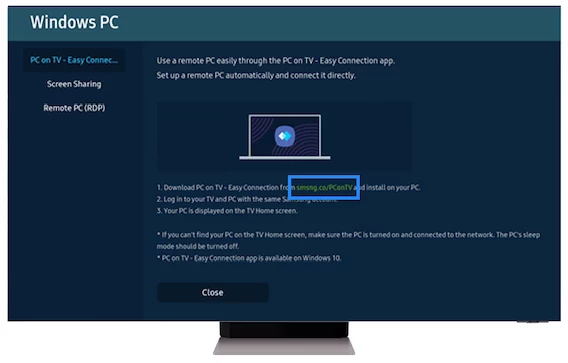
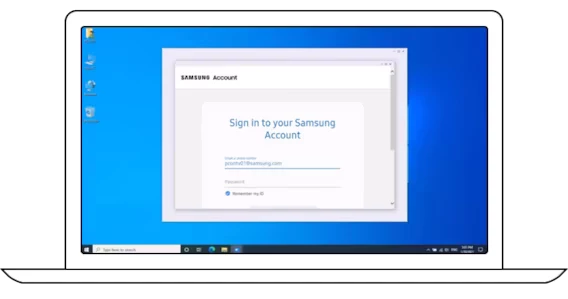
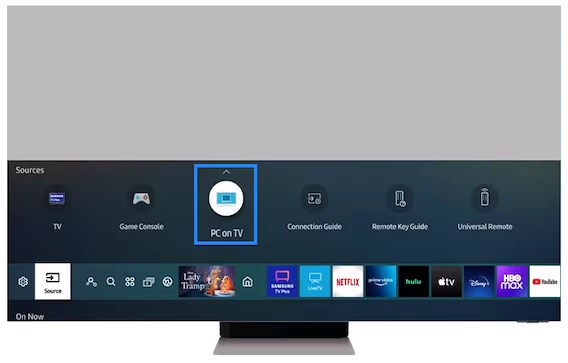
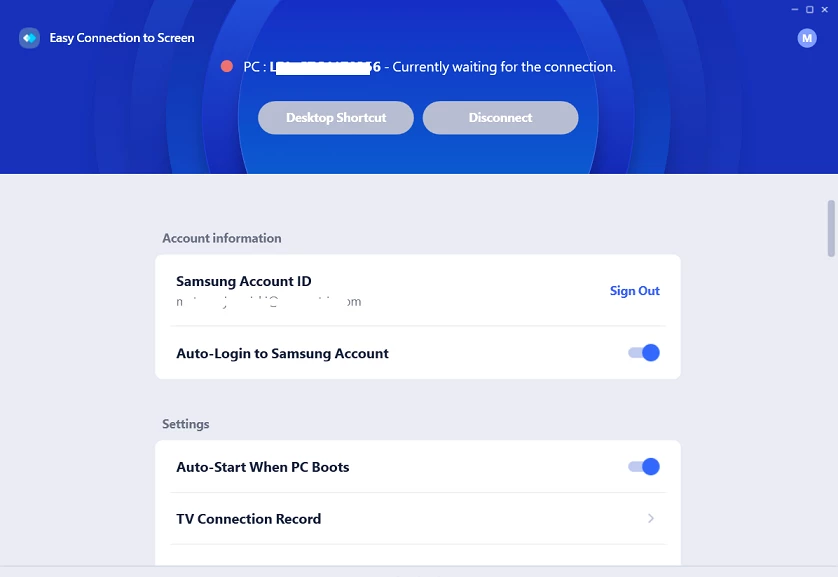
Easy Connection to Screen 6.5.13 is a Samsung app for Windows that lets you use a compatible Samsung TV as a wireless screen for your PC. Instead of running an HDMI cable across the room, you connect over the network and see the PC's desktop on the TV. The app is free, and you can download Easy Connection to Screen for Windows from the Microsoft Store.
| Item | Details |
|---|---|
| Version | 6.5.13 |
| Developer | Samsung |
| Platform | Windows 10 or higher |
| Licence | free |
| Size | about 152.35 MB according to catalogue data |
| Download | Microsoft Store |
Samsung TVs can show a PC's screen in several ways, and this app is the one for Windows PCs connecting over the network. It is handy for presentations in a meeting room, showing holiday photos to the family on the big screen, watching a video stored on the laptop, or working on a large display when the TV is the only big screen in the flat. Samsung explains the options on its page about using the TV as a monitor. According to Samsung, the Easy Connection to Screen app is available on Windows 10 or higher, while the manual connection method is only supported on Windows 10 Professional or higher and Mac OS X10.5 or later. Wireless mirroring always adds a little delay compared with a cable, which is fine for slides and videos but noticeable in fast games or precise mouse work.
Make sure both devices are on the same network and not on a guest network, which often blocks devices from seeing each other. Update the TV's software and the app, and check that the Windows firewall allows the app on private networks. Restarting the TV clears many connection problems.
Everything on your desktop appears on the TV, including notifications. Turn on focus assist or do-not-disturb before presenting, and close private windows first.
For phones, our listings include 1001 TVs: Screen Mirroring and iMyFone MirrorTo. Samsung Flow connects Samsung phones and tablets with a Windows PC.
SHAREit is a free Windows app from the SHAREit Team for moving photos, videos and documents between a PC and a phone. The current version is 5.1.0.7.
Zapya for Windows is a free file transfer app from DewMobile for moving files between a PC and phones over a local wireless connection.

4K Video Downloader Plus is a Windows program from Open Media for saving online videos, playlists and audio for offline use, with a free mode and paid licences.

Internet Download Manager (IDM) is a shareware download manager for Windows from Tonec that accelerates, resumes and schedules downloads.

uTorrent (μTorrent) is a small BitTorrent client for Windows from Rainberry (BitTorrent Inc) for downloading and sharing files over torrents.

AnyDesk is a remote desktop application for connecting to and controlling another computer over the internet, from a small Windows program.

ShareMe is Xiaomi's free app for sending files between devices without a cable; on Windows the Android app runs only inside an emulator.

Xender is a free file sharing app from the Xender File Sharing Team for sending files between phones and computers over a local connection.